The Default Digest Page
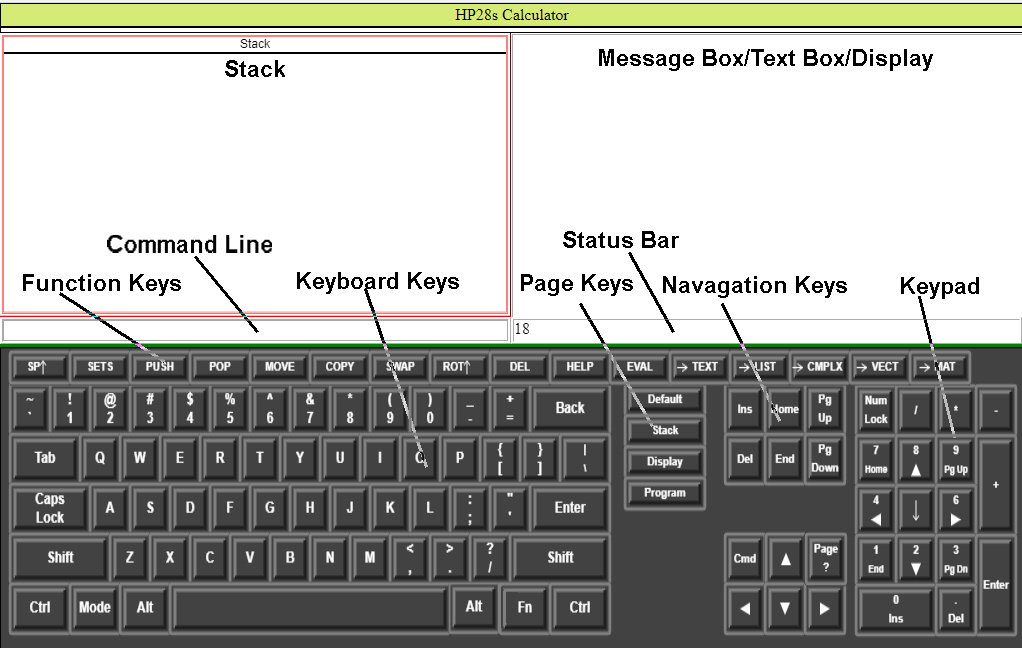
The HP28s emulator program is a collection of PHP/HTML5/Javascript web pages that run in most HTML5 compatible Browsers. For those unfamiliar with Hewlett Packard calculators, many are stack oriented machines that utilize reverse polish notation (RPN) in performing its calculations. The HP28s was an advanced scientific calculator that grouped functions into pages and while the actual HP28s was not extensable, this HP28s emulator is simply by adding new pages.
The illustration above shows the major components of the basic calculator that are accessed using the "Default Page". The major components are:
| Component | Abrev | Description | |
|---|---|---|---|
| The Keyboard | KB | The on screen keyboard tries to mimic the standard Computer Keyboard. The user has the option to enter data using the standard computer keyboard or to use the computer mouse to click on the corresponding key. Most standard keyboards have keys that are unavailable to a program and these keys are used for other functions on the online keyboard. | |
| The Page Keys | PK | The page keys on the on screen keyboard select which page is active. | |
| The Function Keys | FK | Each page has its own set of function keys that are selected when a page is activated. | |
| The Navagation Keys | NK | The navigation keys on the on screen keyboard have two additional keys, the input key that selects between the command line and text input and the digest key that activates the digest page for the active page or if the shift key is pressed along with the digest key, the digest index is shown. | |
| The Keypad | KP | The on screen Keypad mimics the computer keyboard keypad. | |
| The Command Line | CL | When the command line is selected as the input source, data entry from bothe the online and computer keyboards appear in the command line. | |
| The Stack | ST | Input data is stored using a last in first out data stack. Most input when finished is automatically pushed onto the stack and the input source, command line or text box is cleared. | |
| The Status Bar | SB | Single line messages are displayed in the status bar. | |
| The Message Box | SB | The Message Box is the default display in the upper right panel of the screen. It is used to display multiline messages. | |
| The Text Box | TB | The Text Box replaces the Message Box when text input mode is selected. | |
| The Display Screen | DS | The Display Screen Text Box replaces the Message Box or Text Box when it is selected. It is used to show graphical and other visual data. | |
All data input has a data type that is determined when the input is complete. The following fundamental data types are defined at startup.
| Type | Delim | Abrev | Description |
|---|---|---|---|
| Integer | 0-9 | I | An integer is a number in any base preceede by an optional + or - sign not containing a decimal point or exponent. Ex. +12. |
| Real | 0-9 | R | An real is a number in base 10 preceede by an optional + or - sign and containing a decimal point or an exponent. Ex. 1.2e-12. |
| Complex | (...) | C | An complex number consists of two numbers, real or integer, separated by a comma and enclosed in parentheses. Ex. (1,2). |
| Vector | <...> | V | A vector begins with a "<" and contains multiple integers, reals, and complex numbers separated by commas. The "<" and its closing ">" can both be escaped using a \. If the closing ">" has not been entered when the input is complete it is automatically appended to the input. |
| Matrix | <<...>> | M | A matrix also begins with a "<" and is the same as a vector with its contents restricted vectors. The "<" and its closing ">" can both be escaped using a \. If the closing ">" has not been entered when the input is complete it is automatically appended to the input. |
| String | ['"]» | S | A string is a series of any visible character enclosed in either single or double quotes. Within the string, the quotes can be escaped using a \. |
| Name | [[a-z][A-Z]_] | N | A Name begins with an upper or lower case alphabetic character or an "_" and followed by a series of zero or more upper and lower case alphabetic characters, decimal digits or "_". |
| Label | ...: | l | A label is a Name directly followed by a ":". |
| Array | [...] | A | Data that begins with a "[" is considered an array. An array element can hold any data type. Array elements are separated by a comma and can be enclosed in parentheses if they contain a comma. The "[" and its closing "]" can both be escaped using a \. If the closing "]" has not been entered when the input is complete it is automatically appended to the input. |
| List | {...} | L | A list begins with a "{". Its elements separated by commas must have a label followed by the contents of the element. The "{" and its closing "}" can both be escaped using a \. If the closing "}" has not been entered when the input is complete it is automatically appended to the input. Note that the contents of a list can be of any type including another list. |
| Program | «...» | P | A program begins with a « followed by a name an array of parameter names followed by an array of program steps. If a closing » has not been entered when the input is complete it is automatically appended to the input. |