The Stack Digest Page
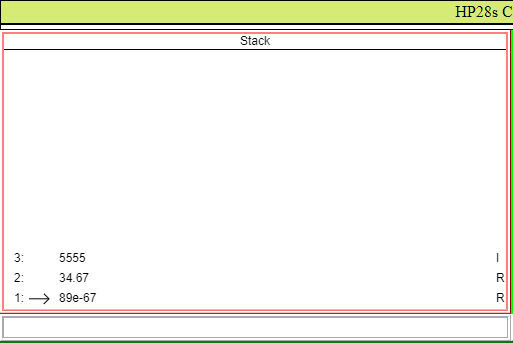
The HP28s stack is a last in first out stack that is used to store data as it is entered by the user. In addition to the default top of the stack (TOS) at level 1, most operations can be carried out at a stack location pointed to by a moveable stack pointer, SP, a stack location contained in the Command Line, and a location selected by the mouse. Multiple items on the stack can be referenced either by selecting them with the mouse or by loading an item counter from the command line.
The number of items the Stack can contain is limited by avaiable memory but only thirteen items can be displayed in the stack viewport. The stack can be scrolled to view any items in the stack.
The stack page contains the following stack functions. The symbols ↓, ↑, ←, and → should be replaced with D, U, L, and R when a command is entered from the Keyboard.
| Function | Keys | Description | |
|---|---|---|---|
| SP ↑ | Moves the SP up one Level | ||
| SP ↓ | [shift] | Moves the SP down one Level | |
| SPC | [ctrl] | Moves the SP up or down the number of Levels given in the Command Line | |
| SPN ↓ | [ctrl+shift] | Pops an Integer from the top of the Stack specifying the Number of levels to move ths SP up or down. | |
| SETS | Sets the Stack Pointer to the Level given by an integer in the Command Line | ||
| SETN | [shift] | Sets the Number Counter to the Integer given in the Command Line. | |
| SETD | [ctrl] | Sets the Destination Pointer to the Level given in the Command Line | |
| SETV | [ctrl+shift] | Sets the bottom of the Viewport to the stack level given by a positive Integer in the Command Line | |
| PUSH | Pushes the value in the Command Line to the top of the Stack. | ||
| PUSHS | [shift] | Inserts the value in the Command Line into the Stack at the Level contained in the SP. The Command Line is then cleared. | |
| PUSHT | [ctrl] | Pushes the content of the Text Box to the top of the Stack. The Text Box is not cleared. | |
| PUSHST | [ctrl+shift] | Pushes the the Text Box to the Stack Level contained in the SP. The Text Box is not cleared. | |
| POP | Pops the top of the Stack to the Command Line. The contents of the Command Line is overwritten. | ||
| POPS | [shift] | Pops the Stack Level contained in the SP to the Command Line. The contents of the Command Line is overwritten. | |
| POPT | [ctrl] | Pops the top of the Stack and appends it to the Text Box. | |
| POPST | [ctrl+shift] | Pops the Stack Level contained in the SP and appends it to the Text Box. | |
| MOVE | Moves the top of the Stack to the Stack Level in the SP. | ||
| MOVES | [shift] | Moves the Item pointed to by the SP to the top of the Stack/ | |
| EXG | [ctrl] | Exchanges the top of the Stack with the Item above it. | |
| DUP | [ctrl+shift] | Duplicates the Item pointed to by the SP on the top of the Stack. | |
| COPY | Copies the top of the Stack to the Command Line. The contents of the Command Line is overwritten. | ||
| COPYS | [shift] | Copies the Stack Level contained in the SP to the Command Line. The contents of the Command Line is overwritten. | |
| COPYT | [ctrl] | Copies the top of the Stack and appends it to the Text Box. | |
| COPYST | [ctrl+shift] | Copies the Stack Level contained in the SP and appends it to the Text Box. | |
| SWAP | Swaps the top of the Stack to the Command Line. The contents of the Command Line is overwritten. | ||
| SWAPS | [shift] | Swaps the Stack Level contained in the SP to the Command Line. The contents of the Command Line is overwritten. | |
| SWAPT | [ctrl] | Swaps the top of the Stack with the Text Box. | |
| SWAPST | [ctrl+shift] | Swaps the Stack Level contained in the SP with the Text Box. | |
| ROT ↑ | Rotates the Stack up one Level. | ||
| ROT ↓ | [shift] | Rotates the Stack down one Level | |
| ROTC ↑ | Rotates the Stack up or down the number of Levels given in the Command Line. | ||
| ROTN ↓ | [shift] | Pops an Integer from the top of the Stack specifying the Number of levels to Rotates the Stack up or down. | |
| DEL | Deletes the top of the Stack. | ||
| DELS | [shift] | Deletes the Item pointed to by the SP. | |
| DELN | Deletes the number of Levels given in the Command Line beginning at the top of the Stack. | ||
| DELSN | [shift] | Deletes the number of Levels given in the Command Line beginning with the Item pointed to by the SP. | |
| VIEW ↑ | Scrolls the Stack up one Level | ||
| VIEW ↓ | [shift] | Scrolls the Stack down one Level | |
| VIEWC | [ctrl] | Scrolls the Stack up or down the number of Levels given by the Integer in the Command Line. | |
| VIEWS | [ctrl] | Sets the bottom of the Viewport to the level given by the Integer in the Command Line. | |
| EVAL | Evaluates the Item at top of the Stack. | ||
| EVALS | [shift] | Evaluates the Item pointed to by the SP. | |
| EVALC | Evaluates the Command Line and Pushes it onto the Stack. | ||
| EVALT | [shift] | Evaluates the Text Box and Pushes it onto the Stack. * | |
| →STR | Converts the Item at top of the Stack to a string. | ||
| →STRS | [shift] | Converts the Item pointed to by the SP to a string. | |
| STR→ | Parses the string at the Top of the Stack. | ||
| STRS→ | [shift] | Parses the string pointed to by the SP and Pushes it onto the top of the Stack. | |
| →LIST | Creates a List from the top of the stack of the Number of Items given by the Integer in the Command Line and Pushes the List onto the Stack. | ||
| →LIST | [shift] | Creates a List from the items pointed to by the SP of the Number of Items given by the Integer in the Command Line and Pushes the List onto the top of the Stack. | |
| LIST→ | Pops the List from the Top of the Stack and then Pushes each item in the List onto the Top of the Stack. | ||
| LIST→ | [shift] | Pushes each item contained in the List pointed to by the SP onto the Top of the Stack. | |
| →CMPLX | Creates a Complex Number by Poping two Numbers from the top of the Stack and Pushes the Complex Number onto the top of the stack. | ||
| →CMPLX | [shift] | Creates a Complex Number by Poping two Numbers pointed to by the SP from the Stack and Pushes the Complex Number onto the top of the stack. | |
| CMPLX→ | Pops the Complex Number at the top of the Stack and then Pushes the Real and Imaginary parts of the Complex Number onto the the Top of the Stack. | ||
| CMPLX→ | [shift] | Pops the Complex Number pointed to by the SP and then Pushes the Real and Imaginary parts of the Complex Number onto the the Top of the Stack. | |
| →VECT | Pops the Number of Numbers specified by the Integer in the Command Line from the Top of the Stack and Creates a Vector from these Numbers and then Pushes the Vector back onto the Stack. | ||
| →VECTS | [shift] | Pops the Number of Numbers specified by the Integer in the Command Line from the Numbers pointed to by the SP and Creates a Vector from these Numbers and then Pushes the Vector back onto the Stack. | |
| VECT→ | Pops the Vector on the Top of the Stack and then Pushes each Vector Number onto the Top of the Stack. | ||
| VECTS→ | [shift] | Pops the Vector pointed to by the SP and then Pushes each Vector Number onto the Top of the Stack. | |
| →MAT | Pops the Number of Vectors specified by the Integer in the Command Line from the Top of the Stack and Creates a Matrix from these Vectors and then Pushes the Matrix back onto the Stack. | ||
| →MATS | [shift] | Pops the Number of Vectors specified by the Integer in the Command Line from the Vectors pointed to by the SP and Creates a Matrix from these Vectors and then Pushes the Matrix back onto the Stack. | |
| MAT→ | Pops the Matrix on the Top of the Stack and then Pushes each component Vector onto the Stack. | ||
| MATS→ | [shift] | Pops the Matrix pointed to by the SP and then Pushes each component Vector onto the Stack. | |
| CLEAR? | Asks to Clear the Stack. | ||
| CLEAR | [shift] | Clears the Stack. | |
In Addition to Function Keys the stack page utilizes the following normal keyboard navagation Keys.
| Function | Keys | Description | |
|---|---|---|---|
| ▴ | The up arrow key moves the SP up one Level | ||
| ▾ | The down arrow key moves the SP down one Level | ||
| ▴ | [shift] | The Shifted up arrow key scrolls the Stack up one Level. | |
| ▾ | [shift] | The Shifted down arrow key scrolls the Stack down one Level | |
| Page Up | The Page Up key moves the SP to the Bottom of the Stack. | ||
| Page Dn | The Page Down key moves the SP to the Top of the Stack. | ||
| Page Up | [shift] | The Shift Page Up key sets the Viewport to the bottom of the Stack. | |
| Page Dn | [shift] | The Shift Page Dn key sets the Viewport to the top of the Stack. | |
The Stack Page uses the following operator keys to perform the indicated operation on the following operands. For the Unary Operators, ~,!,alt +, alt -, and alt Number:
- No modifer key pressed: the operand is Popped from the top of the stack.
- The Shift Key is Pressed: the operand is Popped from the stack level pointed to by the SP.
- The Ctrl Key is Pressed: the operand comes from the Command Line and is pushed onto the Stack.
- No modifer key pressed: the two operands are Popped from the top of the stack.
- The Shift Key is Pressed: the two operands are Popped from the stack from the items pointed to by the SP.
- The Ctrl Key is Pressed: the first operand is Popped from the top of the Stack. The Second operand comes from the Command Line.
- The Ctrl + Shift Keys are Pressed: the first operand comes from the Command Line an the Second operand is Popped from the top of the Stack.
Because the CMCC uses mixed operand mathematical functions the following table lists operators and their legal operands and results.
| Operator | Operand 1 | Operand 2 | Result | Description |
|---|---|---|---|---|
| + | Numeric | Numeric | Normal Arithmetic Addition | |
| + | Numeric | Numeric | Normal Arithmetic Addition | |